Any questions ? +33 1 84 80 35 18.
Tradaka
Account Account
Welcome. Log in Sign in
cart  
Cart
cart  
Menu
  • Menu
    Back
  • Home
  • Departments
    • Petit Small Appliances
    • Home Decor Wholesaler
    • Smartphone Accessories
    • Travel Accessories Wholesaler
    • Pet Supplies
    • Beauty and personal care
    • Baby Products
    • Kitchen
    • Event and Party supplies
    • Toys and games
    • Lamps and Lighting
    • Office Products
    • Household cleaning supplies
    • Storage & Organization
    • Clothing
    • High Tech
  • Cosmétiques
  • Kitchen
  • Small Appliance
  • Bazaar
  • Home Decor
  • Beauty and personal care
  • Travel accessories
  • Smartphone Accessories
  • Toys
  • Storage & Organization
  1. Home
  2. Birthday decoration wholesaler
  3. Birthday balloon

Birthday balloon

Catégories


  • Birthday decoration wholesaler
    • Birthday candles Wholesaler
    • Gift wrap bag
    • Birthday balloon

There are 3 products.

Sort by:
Relevance Name, A to Z Name, Z to A Price, low to high Price, high to low
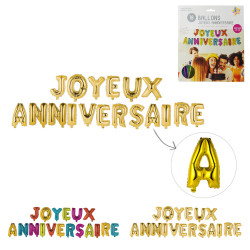
Grossiste ballon Joyeux anniversaire 35cm lettre x18
Out-of-Stock

Ballon Joyeux anniversaire 35cm lettre x18

TRAD6739
€84.96 TTC
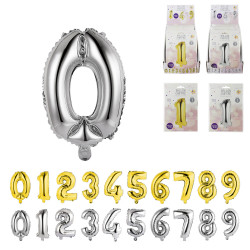
Grossiste ballon en forme de chiffre et animal
Out-of-Stock

Ballon en forme de chiffre et animal

TRAD6735
€43.20 TTC
Grossiste ballon en forme de chiffre réutilisable 35cm
Out-of-Stock

Ballon en forme de chiffre réutilisable 35cm

TRAD6738

€43.20 TTC
Back to top
:(
Current Path : /home/www/tradaka.com/htdocs/lp/
Upload File :
Current File : /home/www/tradaka.com/htdocs/lp/wp-config-sample.php

<?php
/**
 * The base configuration for WordPress
 *
 * The wp-config.php creation script uses this file during the installation.
 * You don't have to use the website, you can copy this file to "wp-config.php"
 * and fill in the values.
 *
 * This file contains the following configurations:
 *
 * * Database settings
 * * Secret keys
 * * Database table prefix
 * * ABSPATH
 *
 * @link https://developer.wordpress.org/advanced-administration/wordpress/wp-config/
 *
 * @package WordPress
 */

// ** Database settings - You can get this info from your web host ** //
/** The name of the database for WordPress */
define( 'DB_NAME', 'database_name_here' );

/** Database username */
define( 'DB_USER', 'username_here' );

/** Database password */
define( 'DB_PASSWORD', 'password_here' );

/** Database hostname */
define( 'DB_HOST', 'localhost' );

/** Database charset to use in creating database tables. */
define( 'DB_CHARSET', 'utf8mb4' );

/** The database collate type. Don't change this if in doubt. */
define( 'DB_COLLATE', '' );

/**#@+
 * Authentication unique keys and salts.
 *
 * Change these to different unique phrases! You can generate these using
 * the {@link https://api.wordpress.org/secret-key/1.1/salt/ WordPress.org secret-key service}.
 *
 * You can change these at any point in time to invalidate all existing cookies.
 * This will force all users to have to log in again.
 *
 * @since 2.6.0
 */
define( 'AUTH_KEY',         'put your unique phrase here' );
define( 'SECURE_AUTH_KEY',  'put your unique phrase here' );
define( 'LOGGED_IN_KEY',    'put your unique phrase here' );
define( 'NONCE_KEY',        'put your unique phrase here' );
define( 'AUTH_SALT',        'put your unique phrase here' );
define( 'SECURE_AUTH_SALT', 'put your unique phrase here' );
define( 'LOGGED_IN_SALT',   'put your unique phrase here' );
define( 'NONCE_SALT',       'put your unique phrase here' );

/**#@-*/

/**
 * WordPress database table prefix.
 *
 * You can have multiple installations in one database if you give each
 * a unique prefix. Only numbers, letters, and underscores please!
 *
 * At the installation time, database tables are created with the specified prefix.
 * Changing this value after WordPress is installed will make your site think
 * it has not been installed.
 *
 * @link https://developer.wordpress.org/advanced-administration/wordpress/wp-config/#table-prefix
 */
$table_prefix = 'wp_';

/**
 * For developers: WordPress debugging mode.
 *
 * Change this to true to enable the display of notices during development.
 * It is strongly recommended that plugin and theme developers use WP_DEBUG
 * in their development environments.
 *
 * For information on other constants that can be used for debugging,
 * visit the documentation.
 *
 * @link https://developer.wordpress.org/advanced-administration/debug/debug-wordpress/
 */
define( 'WP_DEBUG', false );

/* Add any custom values between this line and the "stop editing" line. */


/* That's all, stop editing! Happy publishing. */

/** Absolute path to the WordPress directory. */
if ( ! defined( 'ABSPATH' ) ) {
	define( 'ABSPATH', __DIR__ . '/' );
}

/** Sets up WordPress vars and included files. */
require_once ABSPATH . 'wp-settings.php';

Get to Know Us

Get to Know Us  
  • About Tradaka

Tradaka.com

Tradaka.com  
  • Shipping
  • Legal Notice
  • Conditions of Use and Sale
  • Secure Payments
  • FAQ
  • Contact us

Your account

Your account  
  • Personal info
  • Orders
  • Credit slips
  • Addresses
  • Vouchers

Store information

Tradaka
France
Call us: +33 1 84 80 35 18
Email us: tradcontact@tradaka.com
Store information
Tradaka a reçu la note de 4.1/5 sur 28 avis.

© 2026 - Tradaka.com

Language:
  • Français
  • English
  • Deutsch